Telangana SIR draft notice
Open the official district notice that identifies the 2026 SIR draft electoral rolls and links to the ECI service.
Government of Telangana
Notice dated 17 Aug 2026
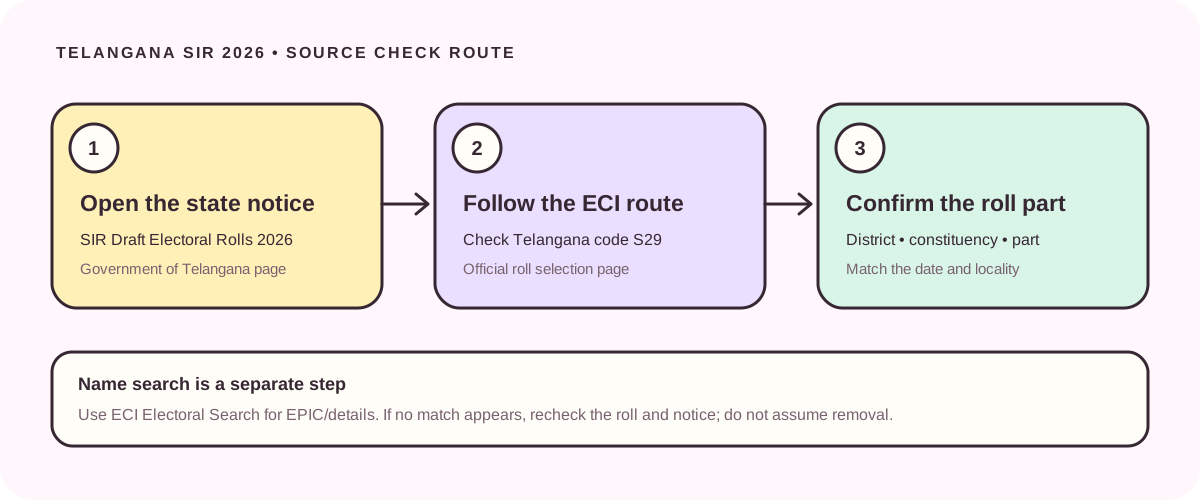
For SIR draft voter list 2026 Telangana, start with the Government of Telangana notice and follow its ECI link for state code S29. The official district notice lists the SIR Draft Electoral Rolls 2026 and shows a publication date of 17 August 2026. This guide explains how to reach the official roll selector, what to check before opening a constituency or part PDF, and how to use the separate ECI name search. The selector is an official page, not a verified direct PDF. We checked these sources on 2 October 2026; this independent guide does not host voter records or decide a person’s status.
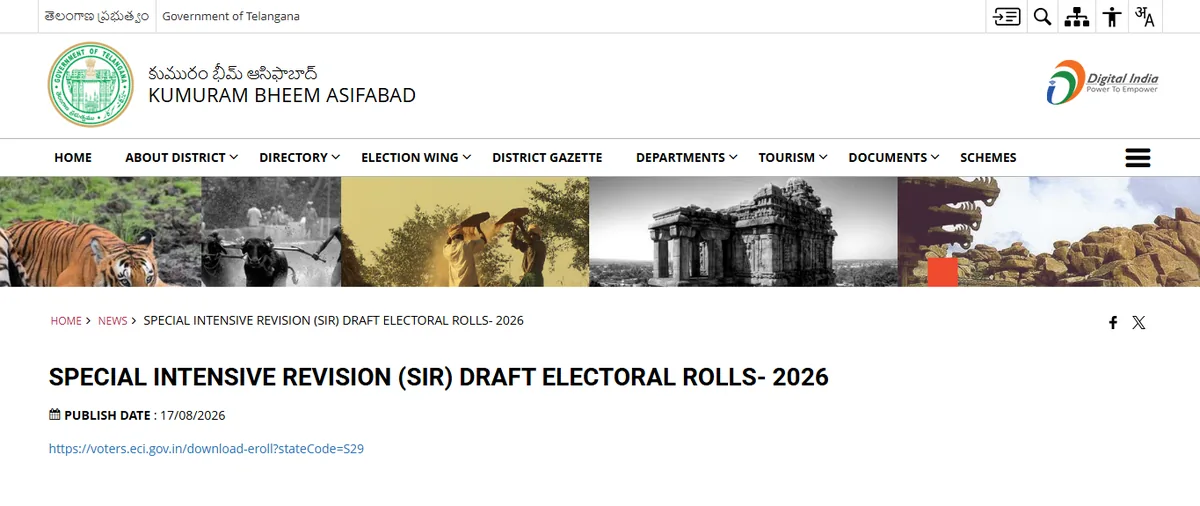
The cards lead to a Telangana government notice, the ECI roll selector, and ECI Electoral Search. These are official pages, not files hosted on this site; the ECI service controls the current selection steps and downloadable roll parts.
Open the official district notice that identifies the 2026 SIR draft electoral rolls and links to the ECI service.
Follow the official link with state code S29 to check which roll editions and locality selections the ECI service offers.
Use the separate official search service to locate an electoral record by EPIC or available personal details.
Use the official Government of Telangana notice titled Special Intensive Revision (SIR) Draft Electoral Rolls – 2026, then follow its link to the ECI download service. The district notice we checked is published by the Kumuram Bheem Asifabad district administration and displays 17 August 2026. Its link opens the ECI roll selector with Telangana state code S29. Start from the notice so you can confirm the context and return to the state source if a portal route changes.
The ECI link is a page where the available roll and locality choices are controlled by the election authority. We did not verify a permanent direct PDF, a universal booth file, or a file size. Select the relevant district, Assembly Constituency and polling part only if those choices are available, then confirm the visible roll label and date before saving a file. A page saying SIR 2026 is not automatically the final roll, and a general electoral search is a separate lookup service.
1. Open the Telangana government notice from the first card or image caption. Confirm that the heading refers to the 2026 SIR draft electoral rolls and that the destination remains an official government or ECI domain. 2. Follow the ECI link carrying stateCode=S29. This parameter identifies Telangana in the linked service; it does not by itself select a district or prove that every part has a downloadable draft file.
3. In the ECI service, choose the available district, Assembly Constituency and roll part that match the elector’s registered address. Local names may appear in more than one language, and constituency or polling-part boundaries can change. Compare the locality and part against a recent official record if possible. 4. Before downloading or viewing a PDF, check its roll year, revision stage, district, constituency, part number and any date printed on the file or portal. If the options or labels differ, stop and return to the current notice rather than guessing.
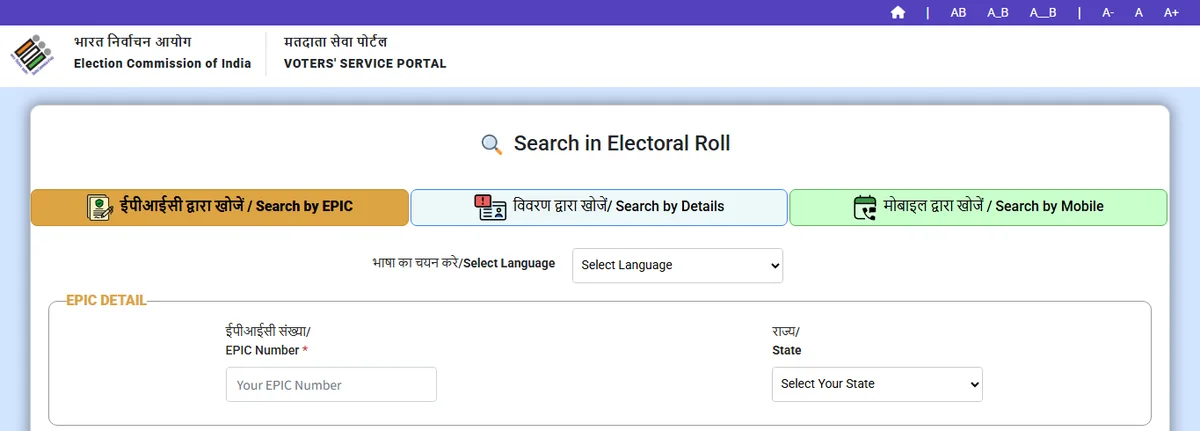
The ECI Electoral Search service is separate from the roll-download selector. Its public page offers search modes such as EPIC and details, and may ask for a captcha or other fields. Use only the official service. Enter the minimum information it requests, select Telangana where applicable, and compare the returned district, constituency and other record context. Do not post an EPIC number, address or screenshot of a personal result in public groups.
Treat search as a way to locate or cross-check an electoral record, not as a shortcut that proves inclusion in a specific SIR draft PDF. The service can show an entry from the electoral database without telling you which exact draft file or polling part you need. If you must establish whether an entry appears in the SIR 2026 draft, also inspect the matching official roll edition and locality in the ECI selector. If the search service is unavailable, return later or use the contact details in the latest official notice.
First, check that you opened Telangana and the intended SIR 2026 draft edition. Retry a search with the EPIC exactly as printed, or with reasonable spelling and transliteration variations if searching by name. Confirm the district, Assembly Constituency, polling part and any changed boundary or locality information. A portal error, an unselected part, an old PDF, or a spelling variation can all affect what you see.
If the entry still does not appear, read the latest Telangana CEO or ECI notice for the applicable claims, objections or correction route and contact the Electoral Registration Officer (ERO) or Booth Level Officer (BLO) named by the official source if you need help. A failed search alone does not establish that a voter has been deleted or is ineligible. Do not submit Form 6 automatically just because a search returned no result: first check the current notice and whether the person’s circumstances call for new enrolment, a correction or another process.
A draft electoral roll is a revision-stage record. A final roll is a later edition only when an election authority publishes it and labels it as final. The official source reviewed for this guide identifies a Telangana SIR Draft Electoral Roll 2026 notice; we did not verify a Telangana final-roll release or a separate final PDF on 2 October 2026. Use the latest state notice for the current status rather than assuming a draft has become final.
The 2002 voter list is a historical record used for an older lookup task. It is not the Telangana SIR 2026 draft and cannot by itself confirm a current entry. A form-status check tracks an application someone submitted; it is not the same as searching a voter list. If your task is an old record, use the Telangana 2002 guide. If you already submitted a form, use the status-check guide. This separation helps avoid opening the wrong service or filing a duplicate application.
The official district notice we inspected is dated 17 August 2026. This page’s source check date is 2 October 2026. We are not publishing a claims deadline because the official state schedule page could not be independently verified during this review, and reports can repeat superseded dates. Before acting, check the current CEO Telangana notice page and the ECI portal for a revised schedule, active service or district-specific instructions.
The correct action depends on the reason a record is absent or incorrect. ECI’s general FAQ describes Form 6 for new enrolment and Form 8 for correction or shifting, but those general form descriptions do not replace the current SIR notice or determine which route fits a person. Follow the latest official instructions and contact the office identified there if a case is unclear. Keep the notice date with your notes so you can tell an updated direction from an older screenshot or downloaded file.
The three buttons above lead to government or ECI pages. They are official-page fallbacks, not verified permanent file URLs. This review did not confirm a booth-specific direct PDF, file MIME type, file size or stable download path, so this guide does not claim to host or directly download a voter list. If the ECI service offers a file, confirm the selection and edition on its own page before saving it.
Electoral rolls can contain personal information. Use the minimum data needed for an official search, keep any result or file in a secure place, and avoid forwarding full records or identifiable screenshots to public chats. This site is independent of the Election Commission and the Telangana election office. It does not store searches, check eligibility, correct an entry or submit a claim. Official notices and services remain authoritative if a route, date or process changes.
These public source pages were reviewed for the Telangana 2026 draft-roll route and general voter-search/form context. Check the live notice again before relying on a date or action.
Start at the Telangana government SIR Draft Electoral Rolls 2026 notice and follow its ECI link for state code S29. The link opens an official selection page, not a verified direct PDF. Choose the available district, constituency and part, then confirm the roll edition and date. This guide did not verify a stable direct PDF or file size.
Use the official ECI Electoral Search for an electoral-record lookup and the ECI Telangana roll selector to find the relevant SIR draft edition and polling part. These are separate services. A search result alone does not prove appearance in a particular draft PDF; compare the matching roll and locality.
Confirm the state, roll year, spelling, EPIC, district, constituency and part. Read the latest CEO Telangana or ECI notice and contact its listed ERO or BLO if the entry still cannot be found. One failed search does not establish deletion or ineligibility, and it is not by itself a reason to file Form 6.
No. A draft and a final roll are different publication stages. The official page checked for this guide identifies a draft-roll notice dated 17 August 2026. We did not verify a later Telangana final-roll publication on 2 October 2026; check the current official notice for status.
No. The 2002 list is historical, while the SIR 2026 draft is a current revision-stage record. Use the Telangana 2002 guide for older records and the official ECI S29 route for the 2026 draft.
It opens the ECI portal page for Telangana roll selection. The available choices may depend on the service and locality. This review did not confirm a permanent booth PDF URL or file size, so use the official page and verify its current download options.
This guide does not state a deadline because a current revised schedule could not be verified from the state notice during review. Check the latest CEO Telangana or ECI notice before acting; do not rely on an old search snippet or another state’s dates.
Not automatically. Recheck the roll edition and locality, then follow the current official notice for the appropriate claim, correction or enrolment route. ECI’s general FAQ describes Form 6 for new enrolment and Form 8 for correction or shifting, but the person’s case and current SIR instructions matter.