
English enumeration PDF reference
Open the file used for the field examples on this page. Compare the heading and date with your current state notice before using it.
PDF reference
English
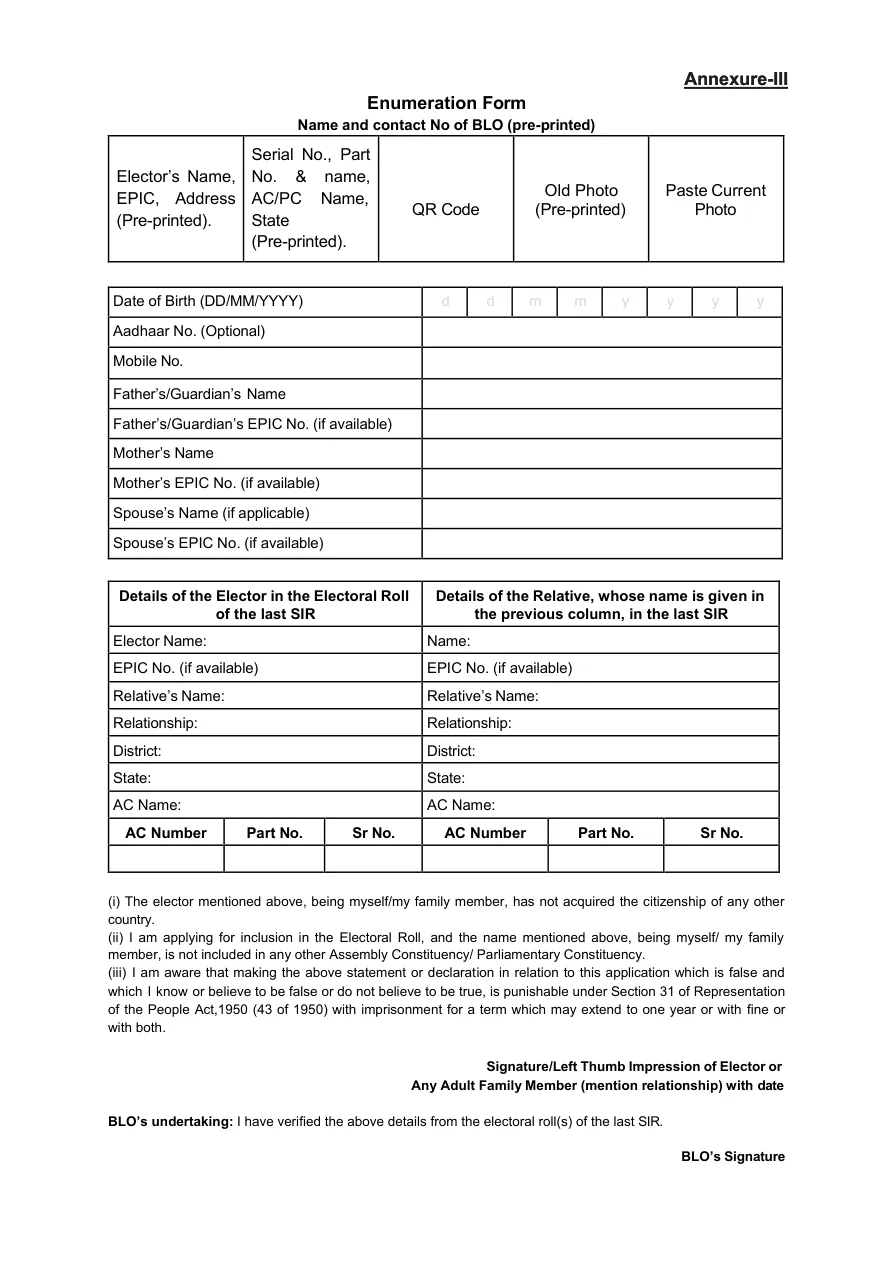
A SIR form fill up sample in English is useful when you want to see the field order before writing on a paper enumeration form. Use the sample as a reading aid, not as proof that every state uses the same version. The checked English reference shows pre-printed voter details, date of birth, contact and family fields, previous SIR-roll details, declarations, and signature areas. Confirm the current form name, date, language, and handover route on the official Voters' Service Portal or your State CEO notice before entering private information.
The reference PDF is a checked file link, but it is hosted by a third party, has no visible version number, and is not presented as the latest official form. Use it to understand the layout. Use ECI or your State CEO website for the final form, field rules, deadlines, language, and submission instructions.
Open the file used for the field examples on this page. Compare the heading and date with your current state notice before using it.
Start here for the official service currently shown for voter forms, SIR instructions, or tracking.
Use the broader guide for preparation, online or paper choices, submission records, and common mistakes.
A sample lets you recognise the layout before you fill anything. In the checked reference, the top area contains pre-printed elector information, EPIC and address details, part and serial context, a QR code, and photo spaces. The next rows ask for date of birth, optional Aadhaar, mobile number, parents or guardian, and spouse details where applicable. The lower half connects the elector and a relative to the previous SIR electoral roll. Seeing those groups together helps you collect the right records without guessing what a blank box means.
The sample does not decide whether you must complete an SIR form, which documents your state accepts, or where the completed page should go. A copied PDF can be old, state-specific, or intended only for reference. Read the official notice beside the form name and revision date. If the notice uses another language or a different field order, follow that current instruction even when the English sample looks familiar. This page is a navigation guide and cannot look up a voter's record.
Start with the fields that may already be printed for you. Name, EPIC, address, part, serial number, assembly or parliamentary constituency, QR code, and photo boxes may come from an official roll or workflow. If a printed detail is wrong, do not overwrite it just to make the page look complete. Ask the BLO, ERO, or State CEO route how corrections are recorded. Keep a private note of the discrepancy and the source that confirmed it.
For blank personal fields, use the spelling and date format shown by the current form. Write only information that the official instruction requests and that you can support. An optional field is not automatically mandatory. A family or spouse field applies only when the form says it does. Never invent an EPIC number, part number, old-roll serial, or relationship to fill an empty cell. A neat sample is less important than a traceable answer.
Use the top block to confirm identity and location. The elector name should follow the source spelling; the EPIC and address should match the record the official process identifies. Part, serial, AC or PC details belong to the relevant roll context, not to a number remembered from another state. Photo and QR areas are not invitations to paste files into an unofficial page. They are visual reminders that the live workflow may connect the form to an official record.
In the personal-details block, prepare the date of birth, mobile number, parents or guardian, and spouse information only when the current form asks for them. Separate current-roll facts from previous-SIR facts. When the form includes declarations and a signature, read the wording before signing; a sample cannot replace the declaration shown on the current page. Keep a blank copy and your private notes separate from any public screenshot.
The previous SIR section is where a sample is most helpful and most easy to misuse. It can show separate columns for the elector and a relative, with name, EPIC where available, relationship, district, state, AC name, AC number, part number, and serial number. Those values describe a historical roll context. They are not interchangeable with the current address or current EPIC. Copy a value only after confirming the year, state, constituency, and part used by the official source.
If a previous-roll entry is missing, use the official search or State CEO help route rather than filling a plausible number. A historical name match is a lead, not automatic proof of identity. Compare relative name, locality, household context, and the full part or serial information. When the official instruction allows an alternative document or asks a BLO to verify the record, follow that instruction and keep the reference private.
A sample helps you prepare, but it does not submit anything and it does not prove that the shown fields are active in your area. The official service may pre-fill some information, ask for a different document, or route you to a BLO. The accepted language, signature method, upload rule, and handover point can differ by state and revision round. Confirm each of those details before you print, sign, upload, or hand over a form.
After you submit through an official route, save the receipt, acknowledgement, or reference supplied by that route. Do not use this page to check a personal status and do not send an EPIC, Aadhaar, phone number, address, OTP, or completed form to anyone who offers to verify it. Use the separate SIR form status guide for the next step. A sample page should reduce confusion, not become an unofficial collection point.
Choose the online route only when the official Voters' Service Portal or State CEO site displays an active service for your area. Read the instructions on that page before entering details, and verify that the browser remains on the government domain. The portal may show an account-specific step that a static PDF cannot represent. If the online route is not available, a paper workflow may still be valid when the current notice or BLO explains where the form should be collected and returned.
Do not combine a PDF from one state with online instructions from another. A search result can expose an old form, a mirrored file, or a generic explanation that omits a local deadline. Use the sample to ask better questions: Which fields are pre-printed? Which records should be checked? Which office accepts the completed form? The official answer to those questions matters more than the sample's visual similarity.

The most common mistake is treating every visible box as a field to complete immediately. Some values may be pre-printed, optional, historical, or reserved for an official verifier. Another mistake is copying a relative's old-roll details into the elector column, or copying current address details into a previous-roll section. Read each column heading and keep a short source note for every number you copy.
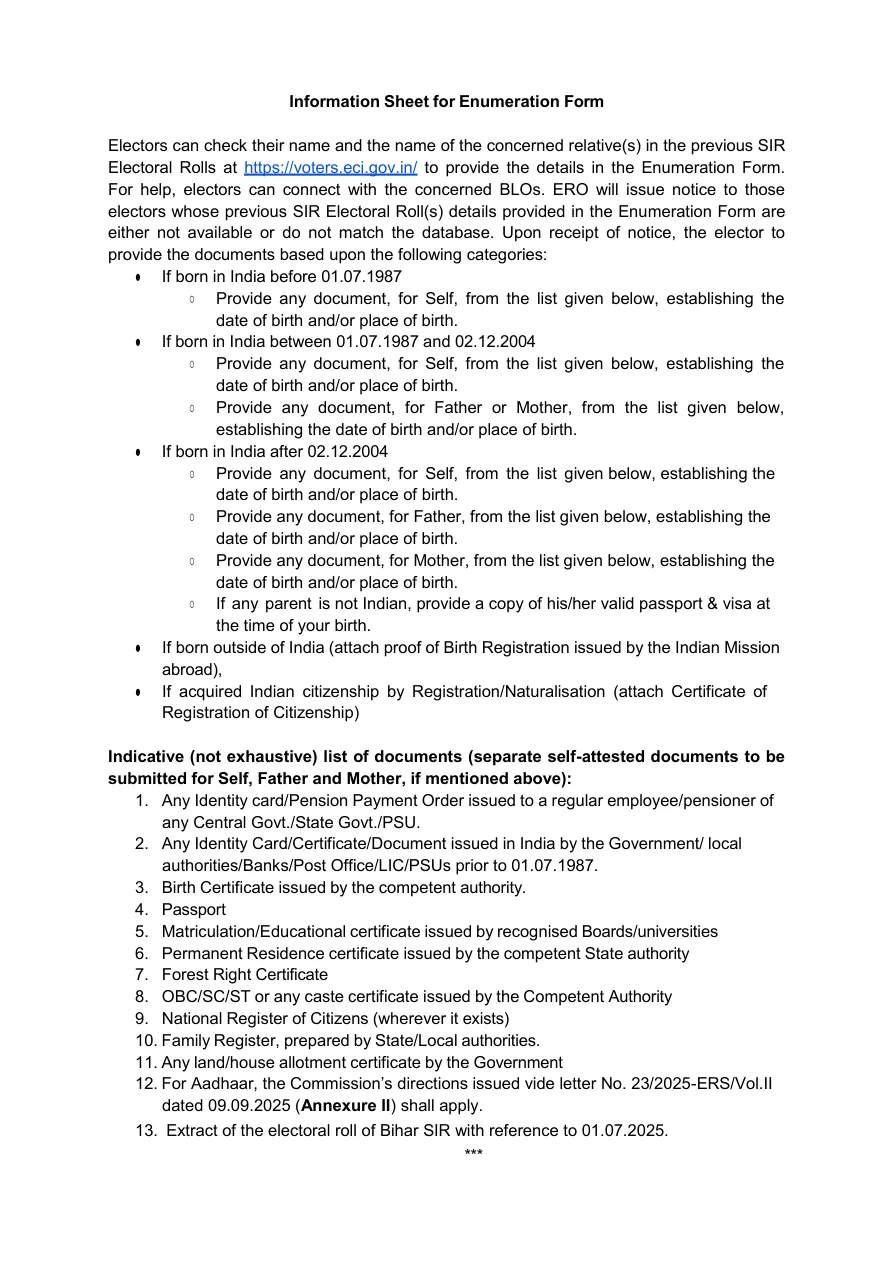
A third mistake is trusting a PDF because it looks official. Check the host, form title, date, state, and notice that explains the workflow. The reference linked on this page returned a valid PDF response, but its host is third-party and its visible file does not establish a current universal version. If the official notice conflicts with the sample, stop and follow the notice.
Recheck the source whenever the revision round, state, form name, or portal route changes. The ECI and Voters Portal endpoints could not be fully inspected from this environment on 14 October 2026, so this guide does not claim that a particular menu, field list, deadline, or submission service is live today. Use the links as entry points and read the current notice that appears for your area. The sample remains useful for vocabulary and layout, but it is not a substitute for current instructions.
If you need a different task, switch pages instead of forcing the sample to answer it. The enumeration PDF page is for locating a reference file, the full filling guide explains preparation and submission choices, the status page covers a submitted form, and the 2002 name-search guide covers historical voter records. Clear page boundaries help you avoid using a sample as a status checker or a historical list as a current form.
Source check: 14 October 2026. The ECI and Voters Portal endpoints returned HTTP 406 to this environment, so their current menus and fields could not be confirmed. The reference PDF returned HTTP 200, application/pdf, and 148,737 bytes, but it has no visible version number and is hosted by a third party. Use the official route as the final instruction.
Use the checked English PDF reference on this page to understand the field layout, then confirm the current form and route on ECI, Voters Portal, or your State CEO website. The reference file is third-party and is not presented as the latest universal official form.
Do not assume that a sample can be submitted. Your state notice may require another version, language, signature method, or handover route. Treat the file as a reading reference until an official source confirms what to use.
The checked reference shows pre-printed elector details, EPIC and address context, date of birth, optional Aadhaar, mobile, parent or spouse fields, previous SIR-roll information, declarations, and signature areas. The current official form controls the final fields.
Do not invent a district, assembly constituency, part, or serial number. Use the official search or State CEO help route and ask what alternative verification the current instruction accepts. A plausible number can attach the wrong historical record.
Only use an online path when the official Voters' Service Portal or State CEO website shows an active service for your area. Read the live fields and instructions there; a static sample cannot confirm that an online route is open.
No latest claim is made. The checked PDF has no visible version number and is hosted by a third party. The ECI and Voters Portal endpoints could not be inspected from this environment, so confirm the current version and instructions through the official route before acting.
No. This site does not need those details. Enter personal information only on a verified official service, never share an OTP, and redact identifiers before showing a screenshot to an official support channel.